Paper TradingSimulatorfor Stocks and Crypto
Practice stock and crypto trading without putting real money at risk. Use $10,000 in virtual capital, follow live market movements, manage positions with practical order controls, and review every simulated trade in your journal and analytics.
See HowPaper TradingWorks in QuantikLab
Follow the workflow from choosing a market and opening a simulated position to recording the trade and reviewing the result.
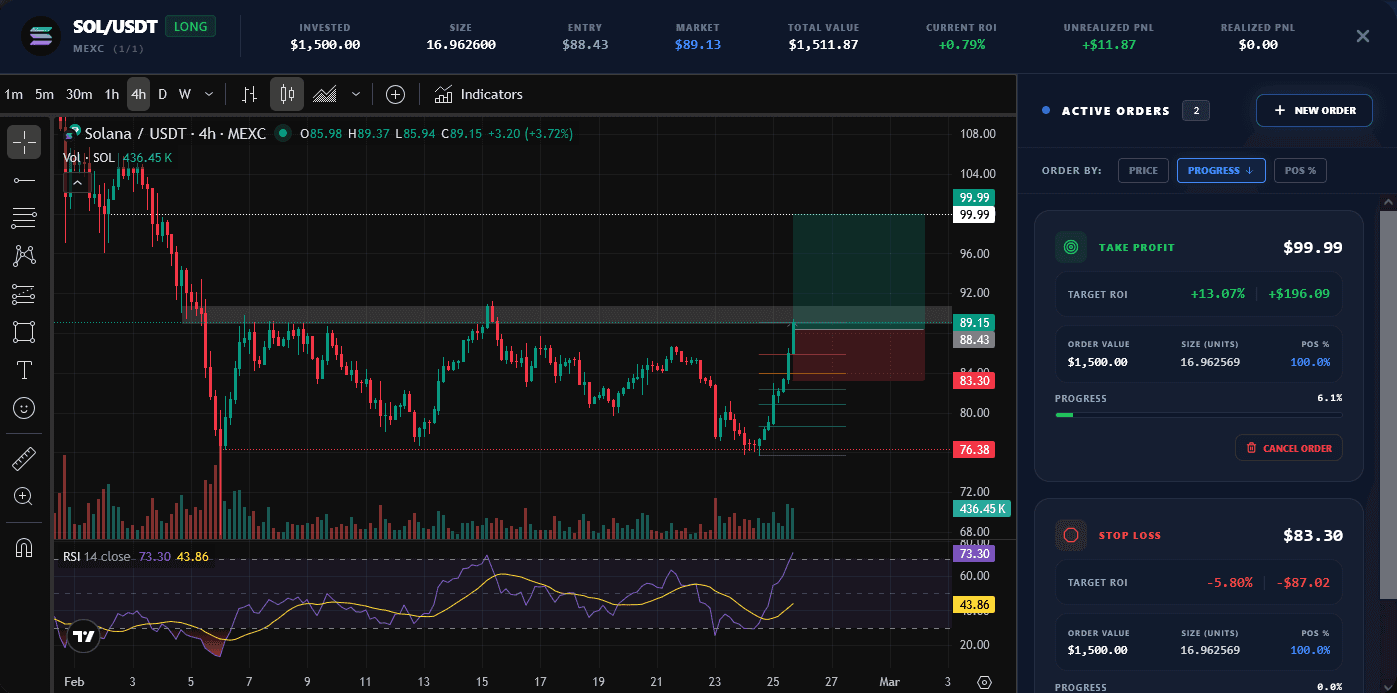
Practice the Process Before Risking Real Capital
Paper trading is most useful when you treat it as structured practice: define the trade, manage the position, record the result and review what happened.
QuantikLab connects those steps in one workflow. Instead of testing ideas from memory or tracking them across screenshots and spreadsheets, you can practice with live market data and keep each simulated trade linked to your journal and analytics.
Use the simulation to test rules, identify recurring mistakes and decide what deserves further refinement before real money is involved.
Practice, Record and Review Every Simulated Trade
Live Market Data
Follow current stock and crypto market movements while you practice, instead of relying on static or historical prices.
Virtual Capital
Use $10,000 in virtual capital to test your rules and position sizing without depositing real money.
Stocks and Crypto
Practice across stocks and cryptocurrencies from one paper trading platform and keep your results in one place.
Practical Order Controls
Manage simulated positions with stop loss, take profit and partial exits as the market moves.
Automatic Trading Journal
Each simulated trade is added to your journal automatically, with no screenshots, spreadsheets or CSV imports.
Turn Paper Trading Into a Repeatable Review Process
A basic stock market simulator helps you place virtual orders. QuantikLab also records each trade and connects it to the journal and analytics you use to review your decisions.
Use your trading data to ask:
- Are my entries becoming more consistent?
- Do I close winning positions too early?
- How much downside risk do I take?
- Which strategies produce the most consistent results?
- How is my execution changing over time?
Who Is QuantikLab Paper Trading For?
New Traders
Learn how orders, position management and market movements work before placing trades with real capital.
Strategy Builders
Test clearly defined rules under live market movements and collect data from each simulated execution.
Stock and Crypto Traders
Practice both markets in one place while keeping positions, decisions and results organized.
Performance-Focused Traders
Review consistency, risk and execution patterns instead of judging a strategy from profit alone.
QuantikLab vs a Broker Demo Account
Broker demo accounts are mainly designed to simulate order placement. QuantikLab also connects each simulated trade to an automatic journal and performance analytics.
| Feature | Broker Demo | QuantikLab |
|---|---|---|
| Virtual capital | Often included | $10,000 included |
| Market data | Varies by provider | Live market data |
| Stocks and crypto together | Varies by broker | One platform |
| Automatic trading journal | Not always included | Recorded automatically |
| Performance analytics | Often limited | Built into the journal |
| Platform-recorded history | Depends on provider | Built from in-platform trades |
More Than a Place to Enter Virtual Orders
No Deposit or Broker Connection
Start with virtual capital without funding an account or connecting a brokerage service.
Automatic Journal
Your simulated trades are recorded during practice, so your trading journal is built without manual imports.
History Built During Practice
Your record is based on simulations completed inside QuantikLab, rather than results reconstructed afterward.
Analytics After Every Trade
Each closed trade contributes to your performance dashboard, helping you review more than profit and loss.
A Clearer Path From Idea to Evidence
Paper trading is useful when it produces information you can review. QuantikLab organizes that process into six connected steps:
Define the strategy
Set your market, entry criteria, exit rules and risk limits before opening a position.
Test with virtual capital
Apply those rules to live market movements without exposing real money.
Record every simulation
Keep entries, exits and position changes attached to the trade automatically.
Review the results
Compare profitability, consistency, risk and execution across trades and strategies.
Refine the rules
Use recurring patterns and mistakes to decide what should be adjusted and tested again.
Build a structured track record
Create a paper trading history based on activity completed and recorded inside QuantikLab.
The result is not a promise of future performance. It is a clearer record of what you tested, how you executed it and what the data showed.
Paper Trading Simulator FAQ
Start Practicing withQuantikLab Paper Trading
Use virtual capital to test your rules, manage positions, record each trade automatically and review your results in one place.