Automatic TradingJournal & Analyticsfor Stocks and Crypto
Turn every simulated trade completed in QuantikLab into structured performance data. Record entries, exits and position changes automatically, organize results by strategy, and review profitability, risk and execution from one connected journal.
See How YourTrading JournalBecomes Performance Analytics
Follow the workflow from a simulated execution to an automatic journal entry, a strategy-level review and a clearer view of the decisions behind the result.
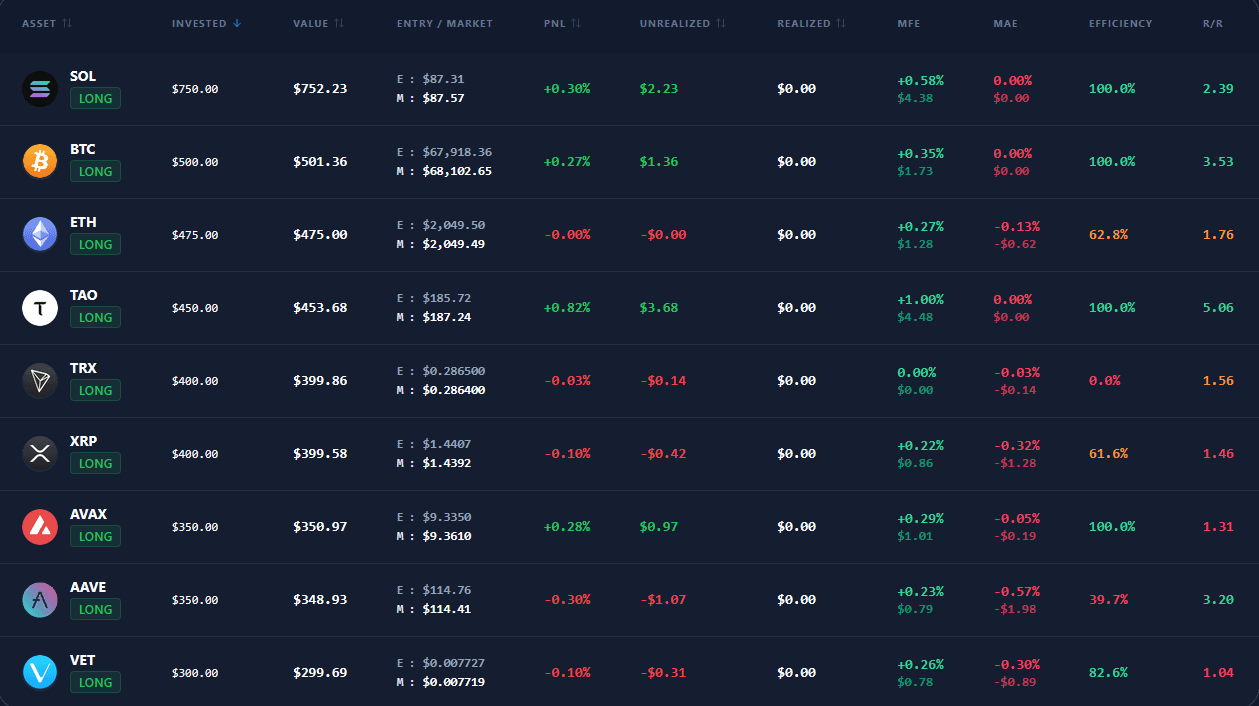
Measure the Process, Not Just the Final Profit
A profitable trade is not always a well-executed trade, and a losing trade does not automatically mean the strategy was wrong.
QuantikLab connects each in-platform simulation to a structured journal and performance review. Instead of relying on memory or rebuilding your history later, you can examine the decisions, risk and execution behind each result.
Use the journal to identify repeated strengths and mistakes, compare strategies on consistent data and decide what should be refined next.
Record the Trade. Review the Decision. Measure the Process.
Automatic Trade Recording
Trades completed inside QuantikLab are added to your journal automatically with their entries, exits and position changes attached.
Strategy-Level Performance
Group results by strategy so you can compare profitability, consistency and execution across different approaches.
Risk and Drawdown Review
Review downside exposure, losing periods and risk patterns instead of judging performance from total profit alone.
Entry and Exit Analysis
Examine how your timing and trade management affect outcomes, including whether winners are closed too early or losses are allowed to grow.
Connected Performance History
Keep your simulated trades, strategies and analytics in one workflow instead of rebuilding the record across separate tools.
Turn Every Trade Into a Reviewable Decision
A basic trading journal stores entries and exits. QuantikLab connects each in-platform simulation to the strategy, risk, execution and performance data you use to review your process.
Use your journal to ask:
- Which strategies produce the most consistent results?
- Where do my largest losses come from?
- How much adverse movement do my trades experience?
- Are my entries and exits becoming more disciplined?
- How does my performance change across markets and strategies?
Who Is QuantikLab Trading Journal & Analytics For?
Paper Traders
Turn simulated activity into an organized record you can review instead of treating each practice trade as an isolated result.
Strategy Builders
Compare clearly defined strategies using consistent trade data and review how each set of rules behaves over time.
Stock and Crypto Traders
Keep simulated stock and crypto activity in one journal while reviewing results across markets and strategies.
Performance-Focused Traders
Study consistency, risk and execution quality instead of measuring progress only through total profit and loss.
QuantikLab vs a Manual Trading Journal
Spreadsheets and manual journals can store trade notes, but they depend on consistent data entry and custom calculations. QuantikLab records in-platform simulations automatically and connects them directly to performance analytics.
| Feature | Manual Journal | QuantikLab |
|---|---|---|
| Trade recording | Entered manually | Automatic for in-platform trades |
| Data consistency | Depends on user input | Same structure for every trade |
| Strategy comparison | Requires custom setup | Built into the workflow |
| Risk analytics | Calculated manually | Connected to the dashboard |
| Screenshots and CSV files | Often required | Not required for simulations |
| Platform-recorded history | Reconstructed afterward | Built from in-platform activity |
A Journal Built Into the Trading Workflow
Recorded at Execution
In-platform simulated trades enter the journal as they happen, reducing the need to reconstruct decisions afterward.
No Manual Imports
Build your QuantikLab journal without copying trades into spreadsheets or uploading CSV files.
Strategy Context Preserved
Keep each result connected to the strategy and decisions that produced it, rather than reviewing isolated profit and loss.
Analytics Connected to Every Trade
Closed simulations contribute to your performance review so the journal becomes a source of structured feedback.
From Trading Activity to Actionable Feedback
A trading journal becomes useful when it helps you connect individual decisions to recurring performance patterns. QuantikLab organizes that review into six connected steps:
Execute the simulation
Open, manage and close a simulated position inside QuantikLab.
Record the trade automatically
Keep the execution details attached to the journal without rebuilding the trade manually.
Organize by strategy
Connect the result to the rules or approach you intended to test.
Measure performance and risk
Review profitability, consistency, downside exposure and execution across your recorded activity.
Identify recurring patterns
Look for repeated strengths, mistakes and conditions that influence your results.
Refine and compare
Adjust your process, collect new observations and compare the next set of results with the previous record.
The journal does not predict future performance. It gives you a clearer record of what you did, how the trade developed and what patterns appeared in the data.
Trading Journal & Analytics FAQ
Turn Your Trades IntoStructured Performance Data
Record every simulated trade automatically, compare strategies, review risk and execution, and build a clearer feedback process in one connected journal.